01
Account compromised?
When an account is no longer under your control, leaving it online can make the damage continue.
 Shizukaze
Decisive control for LINE
Shizukaze is a focused desktop tool for handling LINE account removal through one clear, deliberate workflow.
When Shizukaze matters
Different situations. One decisive outcome. Shizukaze keeps the response direct and easy to understand.
When an account is no longer under your control, leaving it online can make the damage continue.
Blocking one conversation may not stop the source. Shizukaze is designed for a more final response.
A copied identity can spread confusion quickly. Act before the false account goes further.
Some situations call for more than mute, block, or ignore. Shizukaze is built around a clear ending.
How it works
Every screen has one purpose, so the flow stays understandable from the first input to the final state.
Download Shizukaze for Windows and open the desktop application.
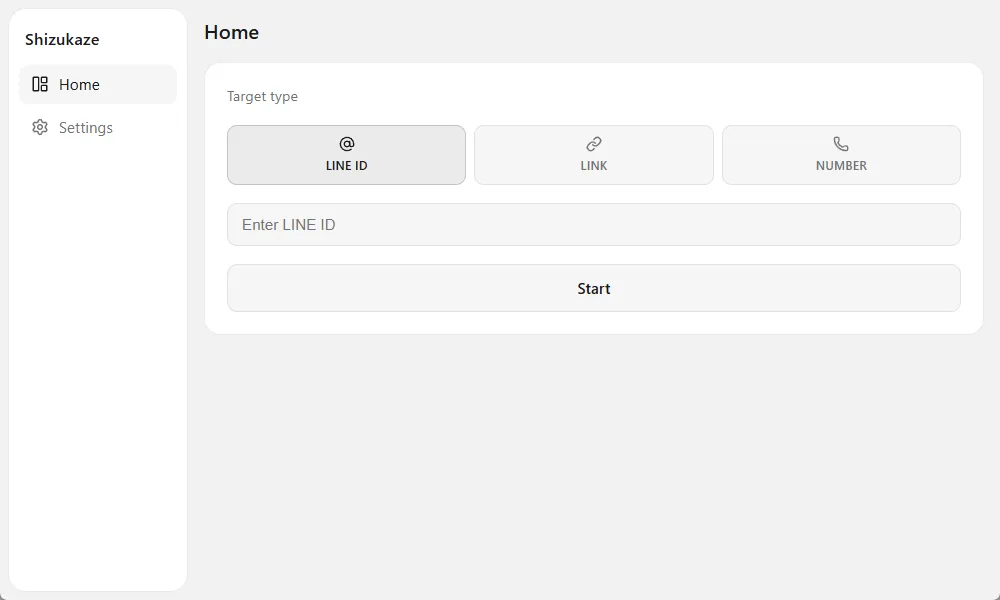
Choose a LINE ID, profile link, or supported number and enter the target.
Start the request and track each stage in one view until it is complete.
Product interface
A quiet interface keeps attention on the target, the current stage, and the result. Nothing else competes for attention.
Questions, answered
Download Shizukaze and install it on a supported Windows device.
Shizukaze currently supports Windows 10 and Windows 11.
Timing can vary. The app shows the current stage and status throughout the process.
Not yet. Mobile support is in development - check this site for updates.
Yes. Shizukaze is completely free for personal use. For corporate use, contact our team.
Yes. Requests are anonymized before being routed through our data centers.
Shizukaze
Direct control for moments when blocking is no longer enough.
Open Shizukaze